
For tradespeople and electricians
The installer’s guide to the smart home.
Ampera turns what your client asks for into a job file: schematics, bill of materials, wiring, labels and a step-by-step installation and commissioning plan, with every room in 3D — for tradespeople and electricians who have not done home automation before.
Ampera is a design guide, not a certification.


The problem
From the client’s wish to a job that works
A client says “I want the lights on scenes, the shutters automatic, cameras and a quiet network.” For an installer who has done classic wiring, that is a pile of new standards, products and rules, and every drawing, list and label gets made by hand. One forgotten cable or an undersized protection costs a day on site.
How it works
How it works
- 01
Describe the job
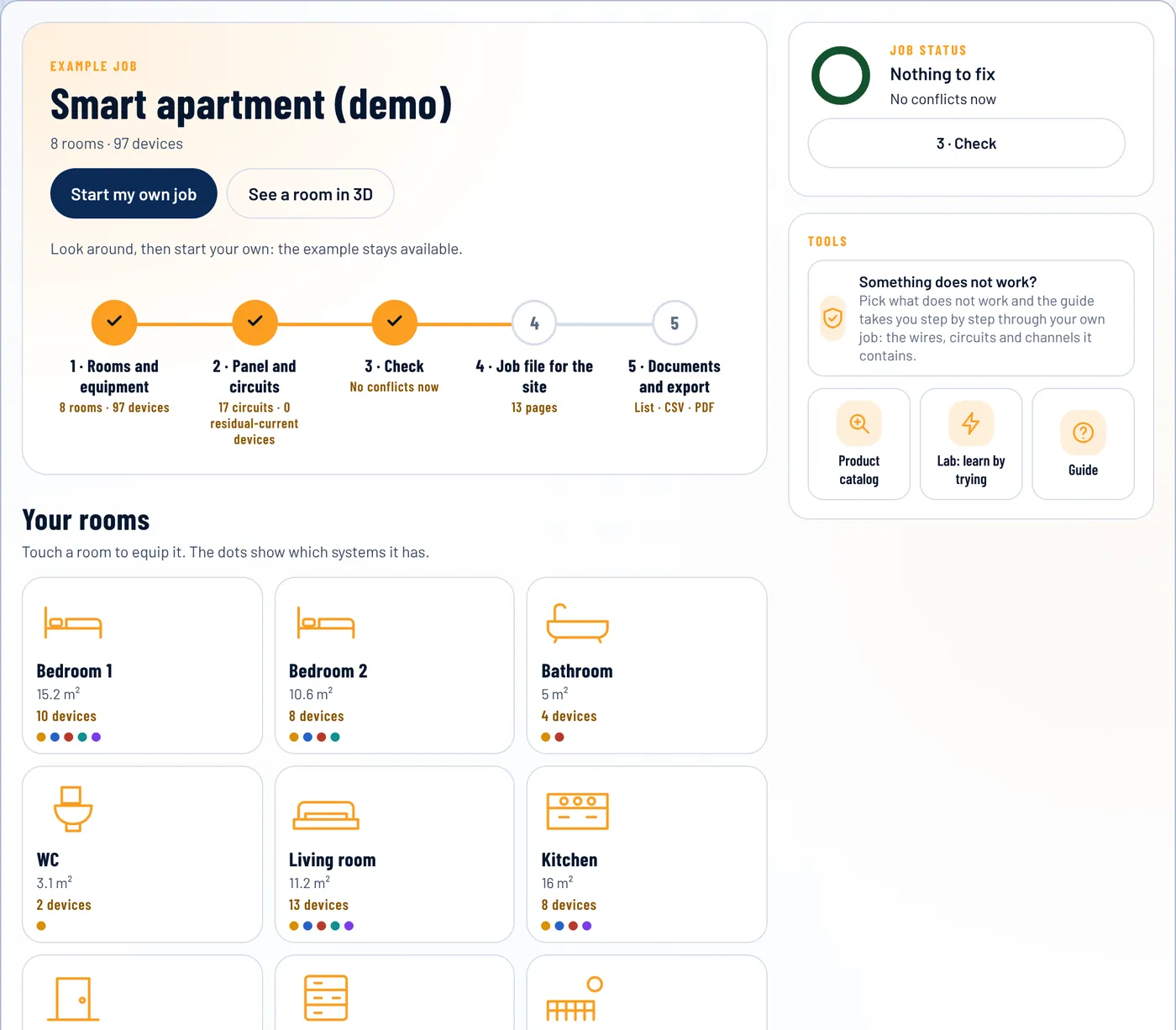
Name the job, the country and the document language, then add the rooms and place the devices in them, or start from a template. Each room is a real 3D scene you can rotate and rearrange.
- 02
Ampera builds and checks the model
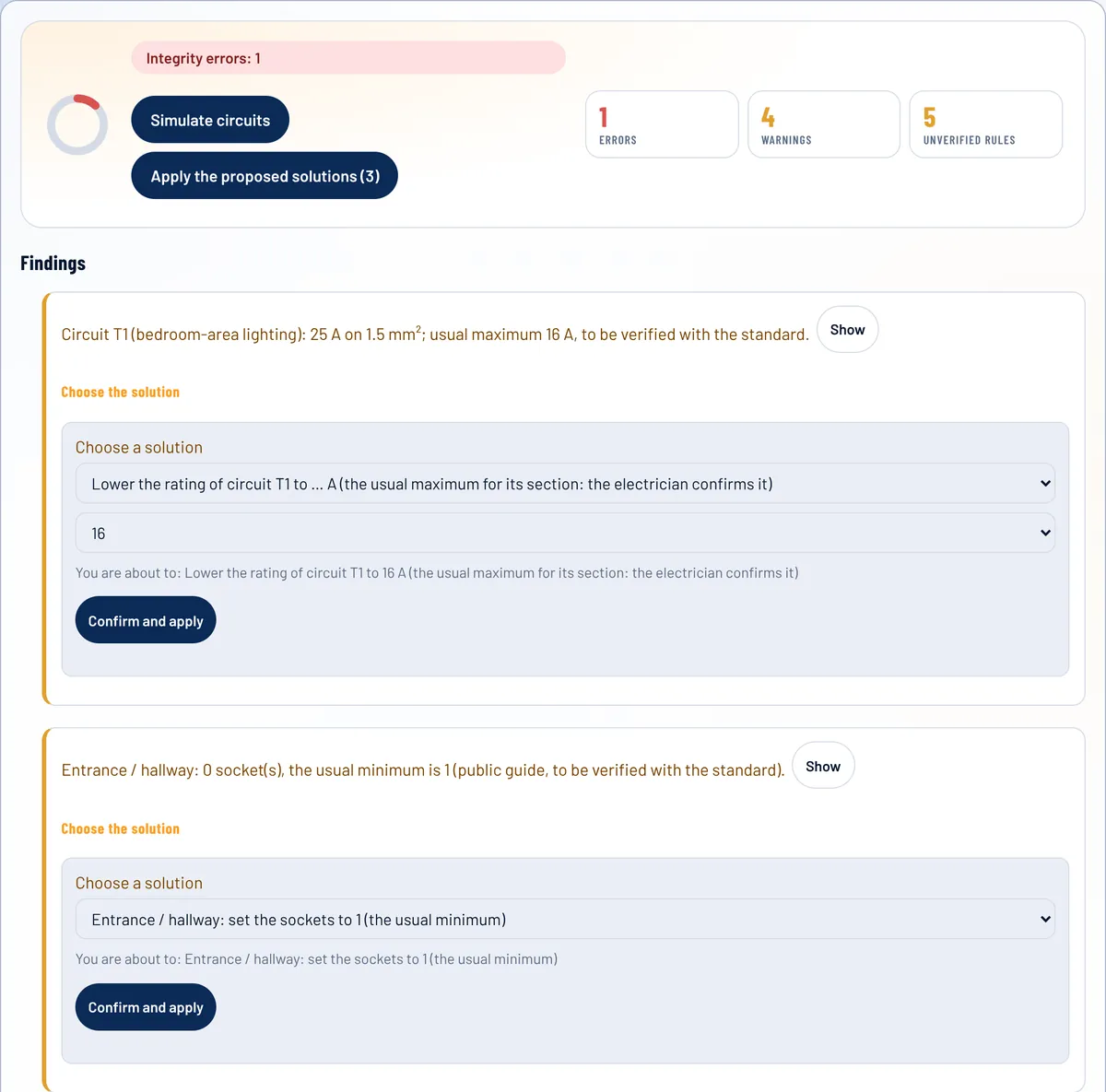
Cable counts, PoE budget, port and channel reserves, storage, breaker rating against cable section, and the checks of the alarm, door entry, access control and coaxial systems. Every finding comes with solutions you pick from a list.
- 03
Get the documents
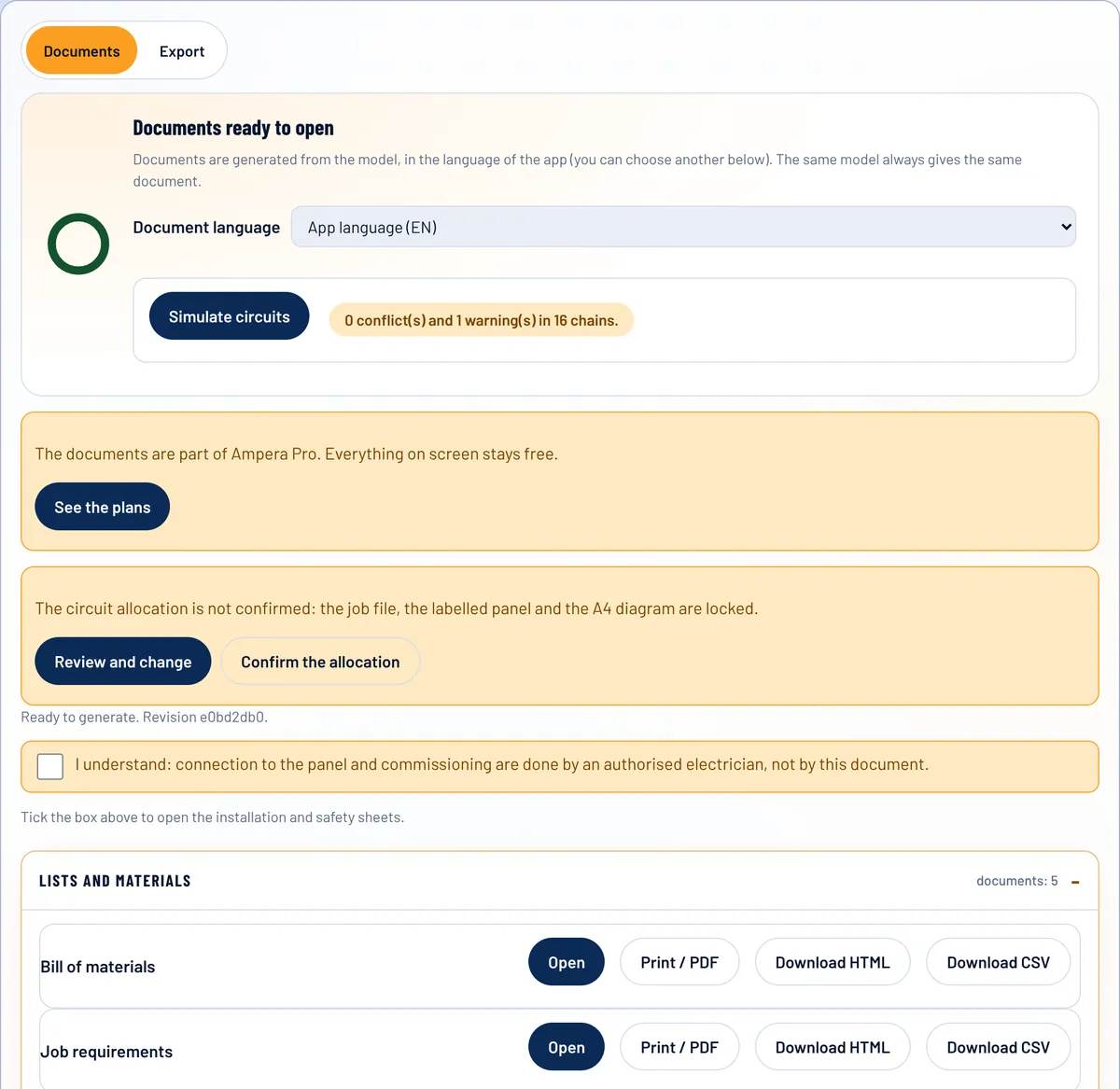
Bill of materials, wiring list, labels, installation sheet and a document for each system, all generated from the same model so they never disagree.
- 04
Install and commission
Follow the order of work and the commissioning checklist. Connection to the panel stays with an authorised electrician.
In the app
Real screens, not mock-ups.
These are captures of the app itself, on its demo projects. Phone on site, tablet with the client, computer in the office: the same project everywhere you open it.


What is in it
Everything between the client’s wish and the store counter.
The room in 3D
Every room is a real 3D scene: rotate, zoom, drag the pieces where they go. The position is saved with the project and never changes the documents.
Detectors on the plan
Each room seen from above, with the detectors where you place them and the range you read from the datasheet. Indicative, not a coverage calculation.
Solutions for every finding
A finding is not just a red line: pick a solution from the list, see what changes, confirm. Rating and cable section are never changed in bulk.
Alarm, fibre, door entry, access, coaxial
Five more systems, each with its own editor, checks, 3D pieces and document. Capacities, currents and losses come from your datasheets, never from Ampera.
Interactive plan
Rooms, pieces and cables by system, in colour. Your own floor plan too: upload it and drag the pieces onto it.
Piece sheets and diagrams
For each piece: what it does, how it connects, the cable and a wiring diagram with wire colours.
Checks before export
Cable counts, PoE budget, port and channel reserves. A value that is not verified is a warning, never a verdict.
Catalog with codes
37,880 product codes from 15 brands, searchable by name or code, to find the exact item at the store.

Shopping list
Add products, set quantities, download a CSV or print a list with brand, code and quantity for the store.
Products on the project
Link a product to each piece. It appears in the bill of materials and does not change the checks.

Documents from one model
Bill of materials, wiring list, labels, installation sheet, KNX plan: one source, so they never disagree.

Ratings proposed by standard
Breaker rating and cable section proposed by circuit category and country, always marked “to be confirmed by the electrician”.

Works like an app
Installable, works offline on site, French, Italian, Romanian and English, with full backup of your projects.
Catalog
The code the store asks for, one search away.
Codes and names collected from the manufacturers’ public catalogs. Not checked by an electrician: confirm the exact code and availability with the manufacturer or the distributor. Products withdrawn by the maker are labelled so.
Wiring devices and boards
- Schneider Electric3,362 products
- Legrand4,654 products
- BTicino8,251 products
- Vimar4,671 products
- Hager6,726 products
- Yokis26 products
KNX and home automation
- Gira5,136 products
- MDT125 products
- ABB329 products
- Siemens235 products
Video surveillance
- Axis1,053 products
- Dahua1,667 products
- Hanwha Vision921 products
Network
- Hikvision177 products
- Ubiquiti547 products
Not yet covered: ABB i-bus KNX, Hikvision cameras, fibre-optic brands. Axis, Dahua, Ubiquiti, Hager and Siemens (KNX) are listed by series with a link to the maker’s page.
Lab · free
Learn the new techniques by trying them
Nine interactive lessons, from the intermediate switch to KNX group addresses and the PoE budget. Free, with no account.


What you get
Every document comes from the same model, so they never disagree.
Why Ampera
Rules, not guesswork
Every check is data, not code. A value that is not verified is shown as a warning, never as a verdict.
One model, every document
The schematic, the list of materials and the labels come from one source, so a change is made once.
Your language
French, Italian, Romanian and English from day one. The documents of a project follow the language you set for it.
Solutions, not only warnings
Every finding comes with proposals you choose and confirm. Rating and cable section are never changed in bulk and stay “to be confirmed by the electrician”.
Who it’s for
Who it’s for
Tradespeople and electricians who know the classic installation and are moving into home automation, network and video surveillance. Small teams who need a clear path from the client’s wish to a finished, tested job. Whoever you are, connection to the panel and commissioning stay with an authorised electrician.
Domus Renov
Built by people who do the work.
Ampera is developed by Domus Renov SRL, a renovation company that designs and installs. It sits on the same Domus platform as Ebanist, the furniture design app already live on Google Play.
Latest from the blog

A board diagram with impulse relays and Wago connectors, wire by wire
How a lighting job with a distribution board, impulse relays and Wago connectors becomes a map you can follow: circuit, junction, relay, lamp, with a code on every wire.
Read →Place the detectors on the room plan
A top view of each room with the detectors where you drag them, and the range you read from the datasheet.
Read →Door entry, access control, coaxial, alarm and fibre in one job
Five systems electricians are asked for besides lighting and sockets, each with its own checks and document.
Read →Web app
Nothing to install. Open it and design.
Ampera is a web app: it runs in the browser on a phone, a tablet or a computer, with no store and no download.
See it work
The demo opens a complete smart-apartment project (a reference plan, not a client’s). Change a parameter and watch the checks react.
Pricing
Free on screen. Pro for the documents.
Design, check and simulate the whole job for free. Pay only when you want the documents on paper or as files.
Free
0 € no card, no time limit
- One job at a time
- Design, plan and diagrams on screen
- Checks and circuit simulation
- Catalogue with product codes
- Project backup (JSON), always
Pro monthly
9 € per month
- Everything in Free
- Several jobs kept side by side
- Open, print and download every document
- Bill of materials and shopping list as CSV
- Cancel at any time
Pro yearly
79 € per year
- Everything in Pro monthly
- One payment for the whole year
- Pro on your other devices with the activation code
Founders
149 € once, Pro for life
- Everything in Pro
- A single payment, no renewal
- For as long as Ampera exists
Prices include VAT. Payment through Stripe. Full refund within 14 days. Conditions and refunds · Ampera is a design guide, not a certification. Connection to the electrical panel, commissioning and compliance are the responsibility of an authorised electrician.
FAQ
Questions
Is it free?
Everything on screen is free: design, plan, checks, simulation and catalogue. The documents of the job and the exports are part of Ampera Pro (9 € per month or 79 € per year).
Does Ampera replace the authorised electrician?
No. Ampera is a design guide. Connection to the panel, commissioning and compliance remain the responsibility of an authorised electrician.
Which products does it cover?
We start with open standards (KNX, Matter, Ethernet/PoE). The catalogue grows with data we verify; unverified data is flagged.
What happens with my e-mail?
It is used only to send you news about Ampera. See the privacy page.
How much does it cost?
The app is free to use on screen. Ampera Pro, which unlocks the documents and exports, costs 9 € per month or 79 € per year, VAT included; Founders is 149 € once, for the first 100 buyers. Full refund within 14 days.
Where do the catalog codes come from?
From the manufacturers’ public catalogs, collected automatically at a gentle pace. They are not checked by an electrician and carry no prices; confirm the code and availability with the store.
Does it work without internet?
Yes, after the first visit the app and the catalog you opened work offline, on site. Your projects stay in your browser: use Export or the full backup in Settings.
Can I use it for a real job?
Yes, as a design guide. It is an early version: values marked as unverified must be confirmed. Connection to the panel, commissioning and compliance belong to an authorised electrician.
Does Ampera know my alarm panel, intercom or access controller?
No, and it does not pretend to. You write the capacities, currents and losses from the datasheet; without them there is no verdict. The wiring it shows is typical and didactic: terminals, polarity and protocol belong to the maker.
Is the 3D room a scale drawing?
No. It is a presentation scene: the room is drawn from its area, small pieces are enlarged so you can see them and the positions you choose do not change the documents. The documents come from the project model.
News about Ampera
Leave your address and we will write when there is something new: versions, functions, catalogues.